FOR INDEPENDENT JEWELERS WITH 4 TO 25 STORES
Custom restocking software for independent jewelers
When a piece starts selling fast, you want it back in the stores where it sells before the weekend.
We build the tool that shows your team what to reorder and runs the supplier quotes to a purchase order, beside the POS you already run. The person who maps how your stores restock is the one who builds it.
Send us a voice note on how your stores restock today. Within 2 working days you get a map of the fix and a clickable prototype, free. No sales data needed.
“He understood the business first and built around it.”
THE PROBLEM
Sound familiar?
If your team still checks stock levels by hand, chases supplier prices over text and types the same order into a spreadsheet and a purchase order, the piece is often back after the wave has passed. Meanwhile the slow pieces sit in the case.
That's what we found at a jewelry retail group in Malaysia with three brands and about 11,000 SKUs. Their ERP held the stock data, but it wasn't flagging fast sellers early enough, so restocking was a reaction.
HOW IT WORKS
The tool we built for them
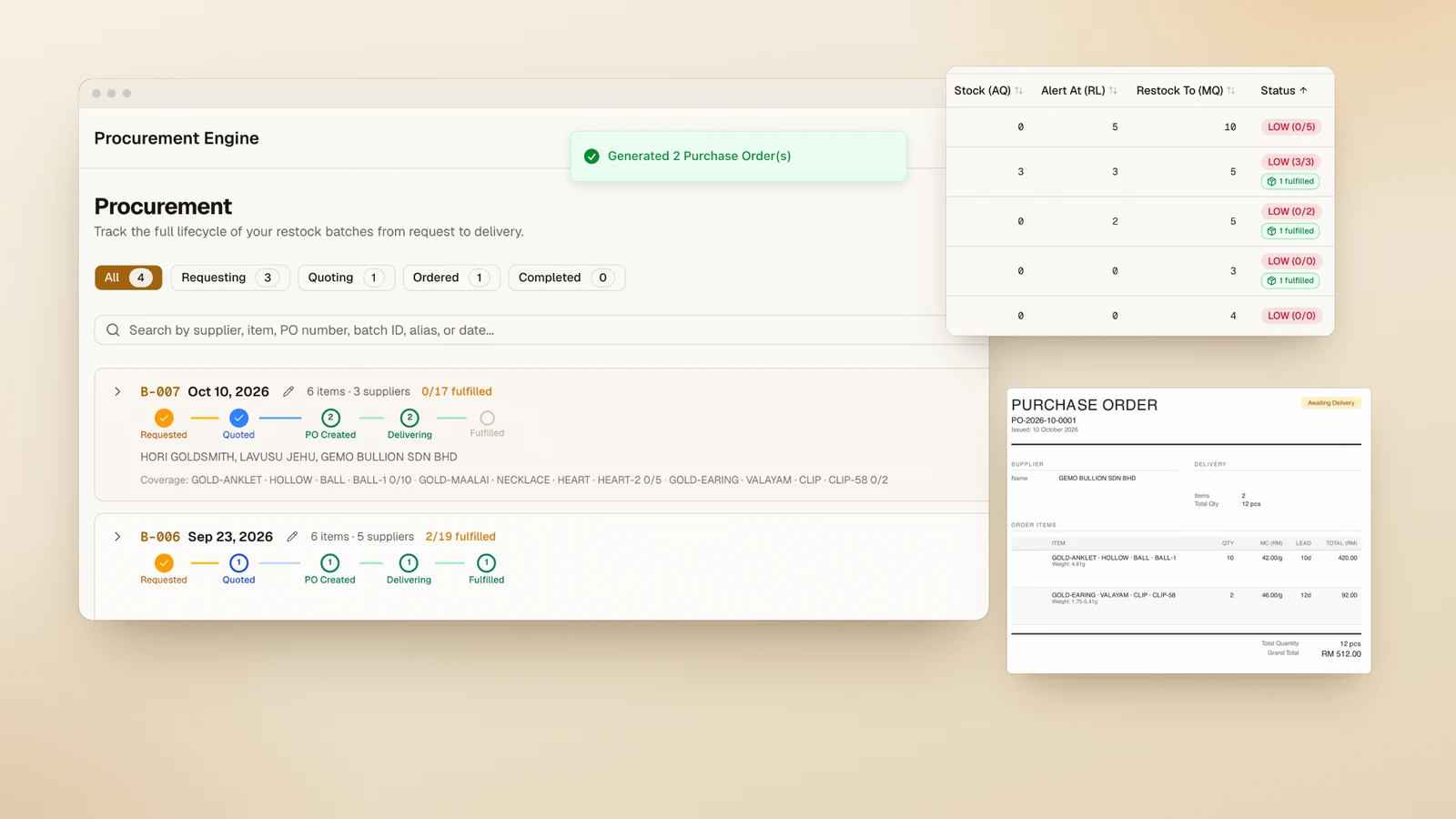
Here's how it works, step by step. Yours would follow your own rules.
- 01
Track
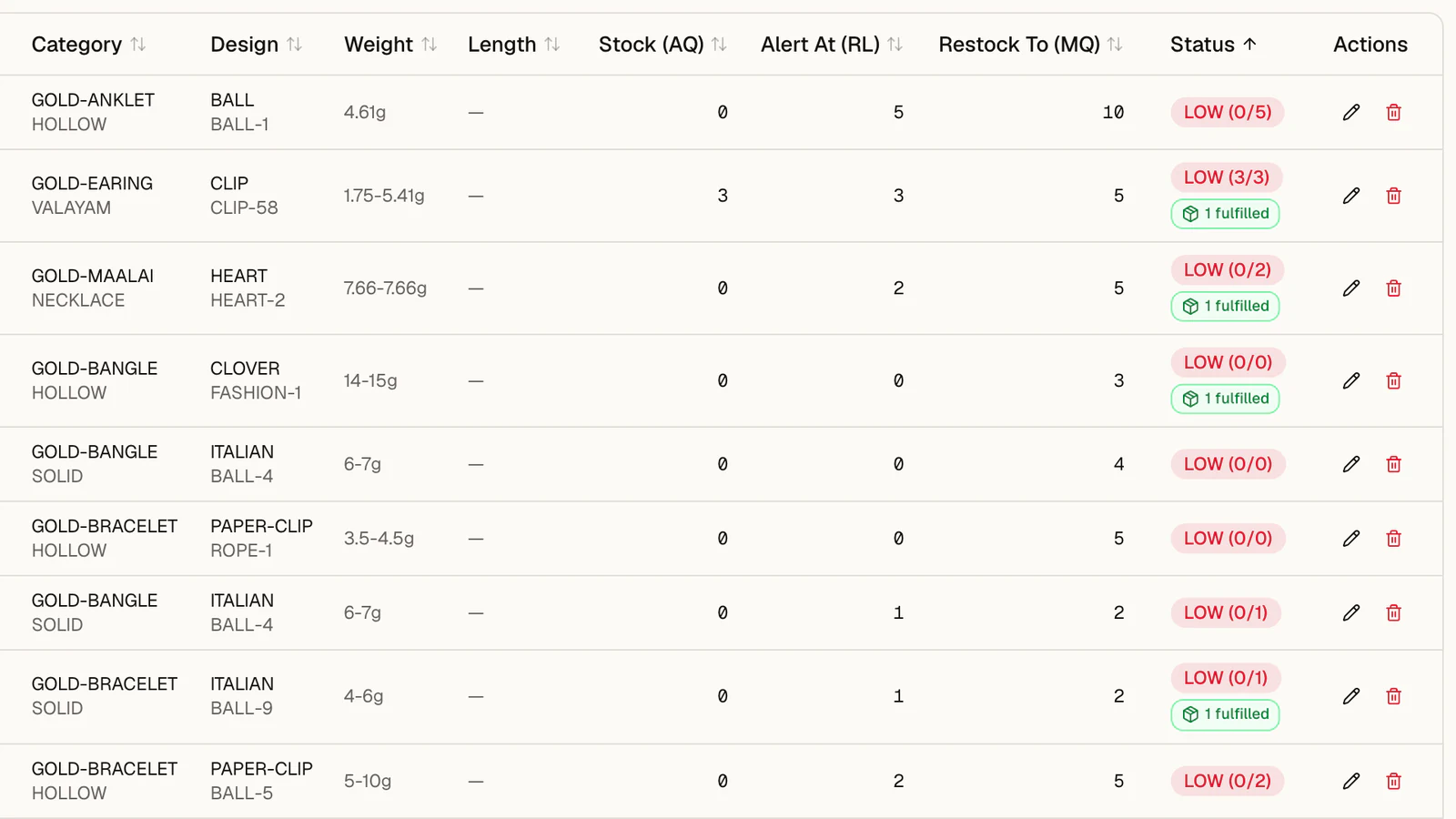
The team sets rules for a category or a single piece: when stock drops below 5, restock up to 15.
- 02
Spot fast sellers
A view of what has sold fastest over the last few weeks, so they can start tracking a piece in one click.
- 03
Request
Low-stock items go into one restock request for each destination. Suppliers are suggested from past purchases, and the team can add others to compare.
- 04
Quote
Each supplier gets a password-protected link and quotes their price, lead time and photos from their phone. There's nothing to sign up for or install.
- 05
Compare and order
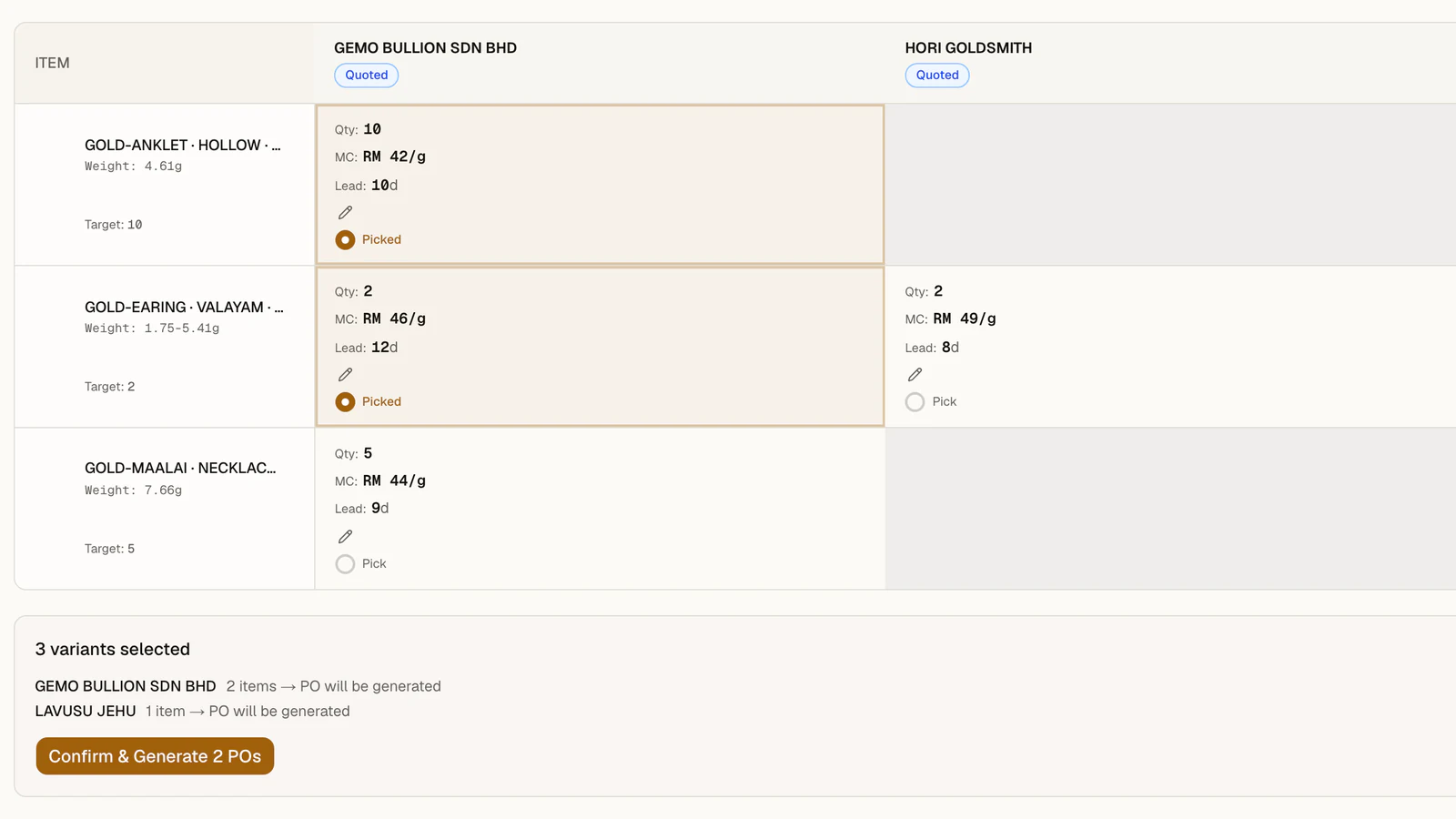
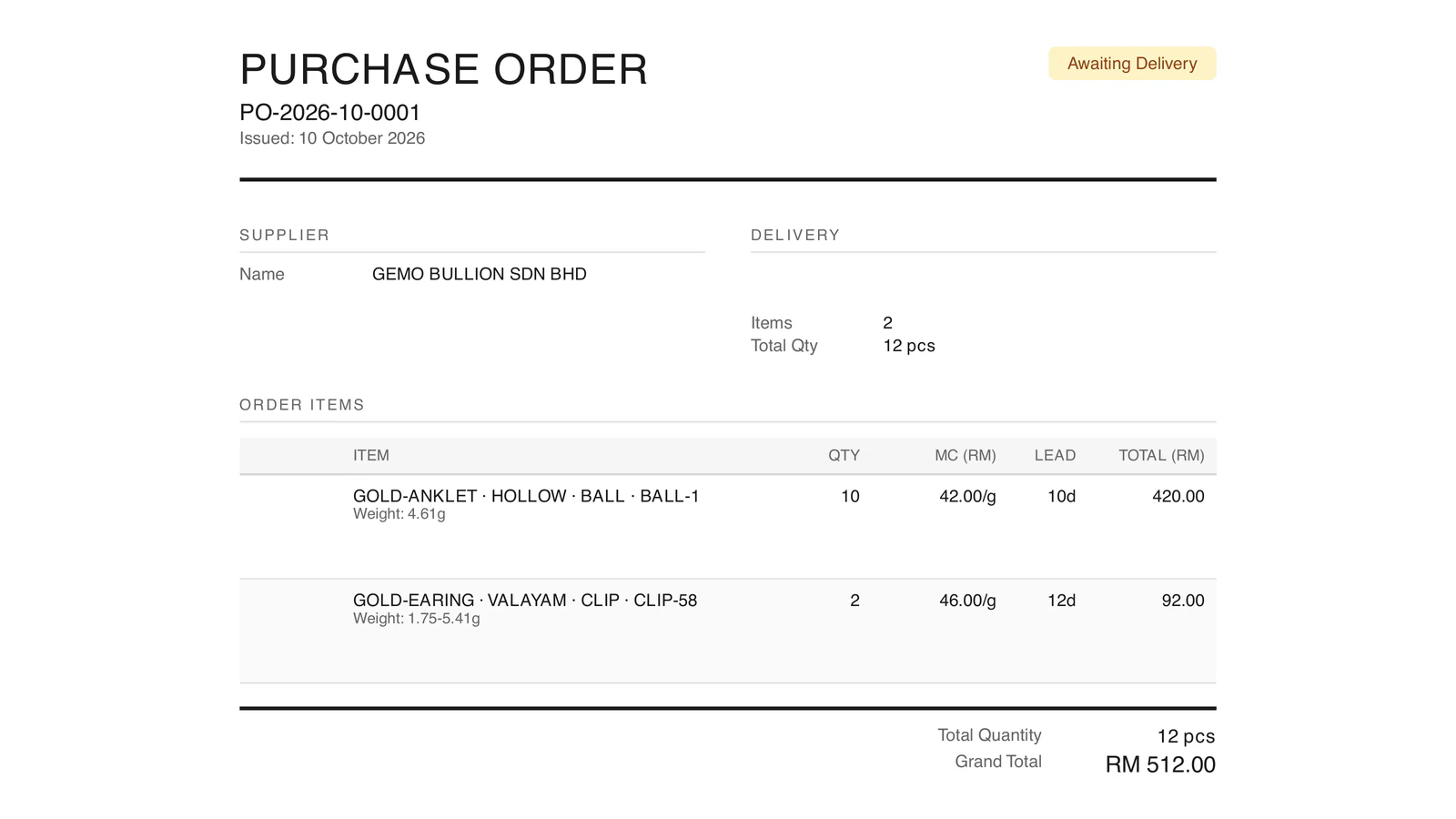
Quotes sit side by side. The team still calls suppliers to negotiate, updates the price, then creates the purchase order.
- 06
Receive
Staff mark each order as fully or partly delivered when the goods arrive.
FROM QUOTE TO ORDER
Demo data, in Malaysian ringgit (RM). MC is the making charge, the labor fee on top of the gold.
YOUR SYSTEMS
Beside your POS, not instead of it
You keep your POS. With the jewelry group, the tool read their ERP every six hours and never wrote back to it, so the ERP stayed the main record.
Whether we can connect to your POS depends on the data it makes available, so that's the first thing we check: an API, a database we can read, or a regular export.
PROOF
HOW WE WORK
- 01
Free Solution Map first.
A voice note on how your stores restock today is enough. Within 2 working days you get a map of the fix and a clickable prototype.
- 02
Projects start from $30,000.
With a fixed price for each stage, agreed in writing before we start and paid in milestones. A first working version usually lands in about 1 to 2 weeks.
- 03
Built in stages.
Some steps stay manual on purpose, like negotiating with suppliers, so your team gets used to each change.
- 04
Calls in your morning.
Written updates in between, invoiced in US dollars.
- 05
After launch.
30 days of free bug fixes, a free check-in call each month for the first three months, and an optional monthly support plan after that. You own the code once the final milestone is paid.
FAQ
Questions jewelers ask
Do we have to replace our POS?
No. The tool reads data from the POS or ERP you already run. With the jewelry group in Malaysia, it read their ERP every six hours and never wrote back to it.
Which POS systems can it work with?
It depends on the data your POS makes available: an API, a database we can read, or a regular export. We check that first, before any build.
Is this AI forecasting?
No. The restocking tool runs on your rules and your recent sales, so your buyers can see why each item was flagged. AI comes in only where it's worth the cost.
Do suppliers need to sign up?
No. Each supplier gets a password-protected link and fills in the quote on their phone: price, lead time, notes and photos.
We run more than one brand or company. Does that work?
Yes. The jewelry group runs three. Each one's stock, rules and orders stay separate, and all suppliers sit in one shared list.
Have you worked with jewelers in the US?
Our jewelry work so far is for a retail group in Malaysia. We take on US projects, hold calls in your morning and invoice in US dollars.
How much does it cost?
Projects start from $30,000. Each stage has a fixed price, agreed in writing before we start and paid in milestones. The Solution Map is free.
How long does it take?
A first working version usually takes about 1 to 2 weeks, then we build the rest in stages. The free Solution Map comes first, within 2 working days.
Who owns the software, and what happens after launch?
You own the code once the final milestone is paid. You get 30 days of free bug fixes, a free check-in call each month for three months, and an optional monthly support plan after that. We're happy to sign a mutual NDA before you share anything.
FREE SOLUTION MAP · ONLY 3 A WEEK
Send us a voice note on the job that frustrates you most.
Get your free Solution Map and a clickable prototype. We send both in 2 working days.
Quotes stuck in WhatsApp. Customer records in a spreadsheet. Tell us about the one job in your business that frustrates you most. It comes straight to Vimall.
No slide deck. No app you have to bend your business around. You see the system we'd build before you spend anything.
Why free? Mapping a few businesses each week is how we find the problems worth solving. We only make 3 a week.
Your workflow map
How it runs today, where it breaks and what it's costing you, in your numbers.
Your clickable prototype
A preview of the system we'd build for you, on demo data, ready to tap through on your phone.
Both are yours to keep. Show them to your partner or your team.